
By David Miguel on Mar 10, 2026

Quick links
- Quick verdict
- Synthesia at a glance
- What is Synthesia?
- Synthesia pricing in 2026
- Synthesia pros and cons
- Key Synthesia features
- What is Synthesia best for?
- Where Synthesia falls short
- Synthesia vs alternatives
- Is Synthesia safe?
- Getting started with Synthesia
- Is Synthesia worth it in 2026?
- Frequently asked questions
Quick verdict
Synthesia is one of the strongest AI video generators for businesses that need to create presenter-led videos quickly and repeatedly without relying on cameras, studios, voice actors, or traditional video production.
Its biggest strengths are AI avatars, multilingual video creation, easy editing, localization, and tools designed for training, onboarding, internal communications, sales enablement, and other repeatable business content. It is particularly useful when the same video needs to be updated or adapted across teams, markets, or languages.
It is less suited to cinematic brand campaigns, highly creative social content, or projects where nuanced human performance and detailed visual direction are the priority. For those use cases, a traditional production process or a more creative generative video platform may be a better fit.
Best for: training, onboarding, internal communications, product explainers, sales enablement, and multilingual business video.
Synthesia at a glance
What is Synthesia?
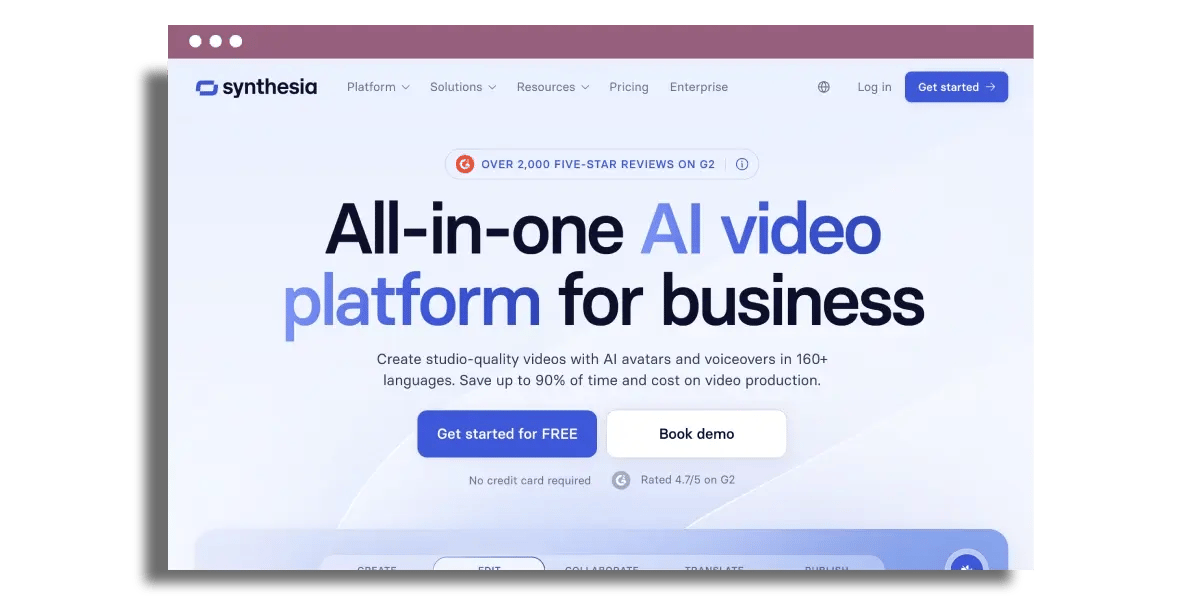
Synthesia is an AI video creation platform built around generating presenter-led videos from text. Instead of filming a person on camera, you write a script, choose an AI avatar and voice, build your scenes, and generate the finished video inside your browser.
That makes it particularly useful for businesses producing large volumes of repeatable content. Training teams can turn written material into video lessons, product teams can create walkthroughs, and global organizations can localize a core video into multiple languages without filming each version separately.
Synthesia is different from AI video tools primarily focused on generating cinematic scenes from prompts. Its strength is structured business communication: a presenter, a message, supporting visuals, branding, voiceovers, translation, and a workflow that non-video specialists can manage.
Synthesia pricing in 2026
Synthesia offers a free Basic plan alongside Starter, Creator, and Enterprise plans. The right option depends largely on how much video you create, how many avatars you need, whether multiple people need access, and whether you require enterprise features such as SCORM export, SSO, or larger-scale collaboration.
Starter expands the avatar library and adds features such as downloads and removal of Synthesia branding. Creator increases video capacity and adds features including personal avatars, API access, interactive videos, and additional collaboration options. Enterprise is where Synthesia becomes more relevant for organization-wide deployment, with features such as SSO, shared workspaces, brand kits, SCORM export, and broader avatar access.
Pricing and inclusions can change, so check Synthesia's current pricing before purchasing.
Which plan should you choose? If you are evaluating the platform, start with Basic and create a genuine piece of content rather than a throwaway test. Starter makes more sense when video becomes a repeatable part of your workflow. Creator suits heavier individual or small-team use, while Enterprise is the more relevant option for learning, compliance, localization, governance, and larger-scale collaboration.
Synthesia pros and cons
Key Synthesia features
AI avatars
AI avatars are at the center of the Synthesia experience. Instead of recording a presenter, you select an avatar and have it deliver your script. Synthesia offers a large library of stock avatars, while paid plans also provide options for creating personal avatars based on your own likeness.
This works particularly well when a presenter is needed for consistency rather than personality. Training modules, process updates, product explainers, onboarding content, and internal communications can all benefit from having a recognizable presenter without arranging a new recording session each time something changes.
AI voices and multilingual video
Synthesia supports video creation across more than 160 languages and accents, allowing a single piece of content to be adapted for multiple markets. Voice, captions, and on-screen content can be localized while the underlying structure of the video remains consistent.
That can significantly simplify global production. Instead of filming separate versions for every region, teams can create a core video and adapt it for different audiences. For pronunciation-sensitive or customer-facing content, it is still worth having a native speaker review the final output before publishing.
Simple video editing
Synthesia is designed for people who do not necessarily have professional video production experience. You can begin with a prompt, document, presentation, template, or blank canvas, then edit scripts, layouts, backgrounds, visuals, avatars, and scenes within the browser.
That removes much of the friction associated with traditional production. If a policy, product feature, or process changes, you can edit the affected content and regenerate the video rather than organizing another shoot.
Screen recording and product walkthroughs
Screen recording makes Synthesia useful for software walkthroughs, onboarding, internal process documentation, and product education. A recorded screen demonstration can be combined with an AI presenter, narration, captions, and supporting graphics to turn a functional walkthrough into a more structured video.
For SaaS companies and internal enablement teams, this is one of the more practical applications of an AI video generator because the source material often changes. Updating a digital video is considerably easier than repeating a full production every time the interface does.
Branding and templates
Logos, brand assets, layouts, and reusable templates help teams maintain consistency across multiple videos. Once the core visual system is established, regional or departmental teams can produce new content without rebuilding the design from scratch.
That becomes more valuable as production scales. The benefit is not only creating individual videos faster, but creating a repeatable system for producing a larger library of content with fewer inconsistencies.
Collaboration and shared workflows
Synthesia includes collaboration features for teams working on scripts, scenes, reviews, and approvals. Rather than passing video files between departments, stakeholders can work within a shared environment and comment on projects before publishing.
For learning, marketing, product, compliance, and sales teams, this can remove the familiar cycle of downloading files, emailing feedback, and trying to work out which version is actually final.
SCORM export and LMS use
For learning and development teams, Synthesia can export generated videos as SCORM packages for use within compatible Learning Management Systems. The feature is available on the Enterprise plan and supports SCORM 1.2 and SCORM 2004 exports.
This makes the platform more relevant for structured employee learning, compliance training, onboarding, and other programs where video needs to sit inside an existing learning environment rather than operate as a standalone asset.

What is Synthesia best for?
Training and onboarding
Training is one of the clearest use cases for Synthesia. Written SOPs, compliance material, onboarding documents, and process guides can be turned into short video modules without requiring a presenter or production crew.
The advantage becomes even clearer when training changes regularly. Updating a script and regenerating a section is far easier than re-recording a presenter every time a policy or product changes.
Internal communications
Synthesia can turn company updates, process changes, leadership messages, and internal announcements into short videos that employees can watch asynchronously. Templates allow recurring communications to follow the same format without needing a new production workflow every time.
Multilingual content
Businesses operating across multiple markets can use one core video as the starting point for localized versions. This is particularly useful for training, product education, customer support, and other situations where the underlying message needs to remain consistent across countries.
Sales enablement
Product teams can create short feature videos, explainers, demonstrations, and sales enablement assets that sales teams can reuse throughout the buying journey. When a feature or message changes, the source video can be updated rather than replaced with an entirely new production.
Product and process explainers
Synthesia also suits content where clarity matters more than cinematic production. Software walkthroughs, procedural videos, customer education, knowledge-base content, and step-by-step explanations all align well with its strengths.
Where Synthesia falls short
Synthesia can remove much of the effort involved in producing business video, but that does not make it the right tool for every type of content.
AI avatars are not the same as human presenters
Avatar quality has improved considerably, but viewers can still recognize the difference between an AI presenter and a real person. That matters less for functional content such as compliance training or process walkthroughs, but more for emotional brand storytelling, thought leadership, or high-profile customer communications.
Creative control is more structured
Synthesia is strongest when you want to make polished business content efficiently. If you want cinematic scenes, unusual camera movement, highly stylized storytelling, or detailed creative direction, another production approach may give you more flexibility.
Paid usage can become a consideration at scale
The free and self-serve plans include monthly video limits, so teams producing a large library of content should model likely output before selecting a plan. The value proposition becomes stronger when Synthesia replaces repeat production work, rather than simply adding another video tool to the stack.
Localization still needs quality control
Generating localized video is fast, but important customer-facing or compliance content should still go through human review. Language, terminology, pronunciation, tone, and cultural context can all require attention before a translated video goes live.
Synthesia vs alternatives
The best Synthesia alternative depends on what you are actually trying to create. Not every AI video generator solves the same problem, so it helps to distinguish business avatar platforms from broader editing and cinematic generation tools.
Synthesia stands out most clearly when the requirement is structured business communication at scale. If your goal is AI-generated visual storytelling rather than an AI presenter explaining information, a tool such as Runway belongs in a different part of the category.
Is Synthesia safe and reliable?

Security is an important consideration for an AI video platform that may contain internal training material, employee information, product knowledge, or customer-facing content. Synthesia states that it is SOC 2 Type II and GDPR compliant and provides enterprise security controls for organizations with more formal governance requirements.
The platform also uses consent requirements for personal avatars. Someone creating an avatar based on their own likeness must complete a live consent process, helping reduce the risk of unauthorized avatar creation.
For organizations in regulated industries or those working with sensitive information, certification alone should not replace internal due diligence. Review Synthesia's current security documentation, data-processing terms, permissions, and plan-level controls against your own policies before deploying it across a team.
Getting started with Synthesia
The easiest way to evaluate Synthesia is to start with a real use case. Instead of generating a random demo, choose an existing piece of content your business could genuinely use: an onboarding step, a product explanation, a short training module, or an internal process update.
Start with the free plan, choose an avatar, add your script, build the supporting scenes, and generate a short finished video. Then review the things that actually matter to your team: avatar quality, voice quality, editing time, brand consistency, ease of updating, and how the final video performs with its intended audience.
If multilingual content is important, use the same test to create a localized version and have someone fluent in the target language review it. If training is the intended use case, test how the video fits into your LMS and approval workflow before committing to a larger deployment.
The key is to test the workflow, not just the novelty of generating an AI presenter. Synthesia becomes valuable when it saves time on content you will produce repeatedly.
Is Synthesia worth it in 2026?
Synthesia is worth considering if your business regularly produces training, onboarding, internal communications, product education, or multilingual video and traditional production creates too much cost or friction.
Its strongest advantage is repeatability. A video can be created without filming, adapted for different markets, updated when information changes, and managed within a shared platform. That makes it particularly useful for organizations where video is an ongoing communication format rather than an occasional campaign asset.
It is not a replacement for every form of video production. High-end campaigns, emotionally driven storytelling, and highly creative visual concepts still benefit from human presenters, directors, editors, and more flexible production tools.
For structured business video, however, Synthesia offers a compelling balance of speed, usability, localization, and scalability. The best way to judge its value is to test it against one repeatable workflow and compare the time, cost, and quality with the way you create that content today.
Frequently asked questions
What is Synthesia and how does it work?
Synthesia is an AI video generator that creates presenter-led videos from text. You provide a script, choose an AI avatar and voice, build your scenes, and generate the finished video without needing a camera, studio, or traditional editing workflow.
Is Synthesia free?
Yes. Synthesia's Basic plan is free and currently provides up to 10 minutes of generated video per month. Paid Starter, Creator, and Enterprise plans add more avatars, features, collaboration options, and production capacity.
How much does Synthesia cost?
Synthesia currently offers a free Basic plan, Starter at $29 per month when billed monthly, Creator at $89 per month when billed monthly, and custom Enterprise pricing. Annual billing is also available for the self-serve plans. Check Synthesia's pricing page for the latest rates and inclusions before purchasing.
What is Synthesia best used for?
Synthesia is particularly well suited to training, onboarding, internal communications, product explainers, sales enablement, process documentation, and multilingual business video. It is strongest when content needs to be produced repeatedly or updated regularly.
Can I use Synthesia for training and internal communication?
Yes. Training and internal communications are two of Synthesia's strongest use cases. Teams can create presenter-led lessons, onboarding videos, process updates, and internal announcements, while Enterprise customers can also export videos as SCORM packages for compatible Learning Management Systems.
How many languages does Synthesia support?
Synthesia supports video creation and localization across more than 160 languages and accents. Available voices and specific language features can vary, so review the current language options if a particular market or dialect is essential to your project.
How many AI avatars does Synthesia have?
Synthesia offers more than 240 stock AI avatars on its Enterprise plan. The number available on self-serve plans is lower, with avatar access increasing across the Starter and Creator tiers. Personal avatars are also available on paid plans.
Is Synthesia safe for business use?
Synthesia is SOC 2 Type II and GDPR compliant and provides additional security and governance capabilities for enterprise customers. Organizations handling sensitive or regulated data should still review the platform's current security documentation and data-processing terms against their internal requirements.
Does Synthesia support SCORM?
Yes. Enterprise customers can export generated videos as SCORM 1.2 or SCORM 2004 packages for use in compatible Learning Management Systems.
Is Synthesia better than HeyGen?
It depends on the use case. Synthesia is particularly strong for structured business video, training, localization, governance, and enterprise workflows. HeyGen is another strong option for avatar-led video and may appeal more to teams focused heavily on marketing content and avatar presentation. Test both against the type of video you actually plan to produce.
Is Synthesia worth paying for?
Synthesia is most likely to justify its cost when it replaces recurring video production work. If your team regularly creates training, product, internal, or localized videos, the ability to generate and update content without organizing new shoots can make a paid plan worthwhile. Occasional users may find the free plan sufficient for testing and lighter use.

The best healthcare marketing software for clinics and private practices
The essential healthcare marketing software stack for clinics. Increase patient bookings, automate follow-ups and track revenue.
AI Governance for Business: A Practical Framework
Explore our complete guide on AI governance for business in 2026, offering unique insights and practical strategies for success.

Chatbots for ecommerce: Explore AI-powered live chat software
Innovative chatbots for ecommerce that improve customer engagement and increase sales with AI-powered live chat solutions.