

By David Miguel on May 23, 2026

Quick links
Key takeaways
- With inexpensive and free SEO tools, you can improve your search rankings, attract more organic traffic, and make a small marketing budget go a long way! Begin with fundamental features like keyword research, on-page analysis, backlink tracking, and rank monitoring.
- You should instead prioritize SEO software that provides intuitive dashboards, automation, and clear reporting so you can grasp performance quickly without specialist knowledge. Look for tools that integrate with ones you already use, such as Google Analytics, Google Search Console, and WordPress.
- You’ll enjoy tools for local SEO such as Google Business Profile optimization, review tracking, and local rank tracking. These capabilities assist you in appearing in local searches, standing up against local competition, and converting local customers better.
- You have to approach keyword research, on-page optimization, backlink analysis, and rank tracking as a continuous workflow, not a one-off project. Go wild with your tools. Develop keyword lists, resolve technical issues, monitor new and lost links, and analyze ranking trends on a monthly basis.
- I recommend you test more than one SEO tool through free trials or free plans before you make a decision to buy. Match them against obvious criteria like ease of use, depth of features, scalability, and support when choosing an SEO tool for your business size and goals.
- You’ll get the best results when you combine automation with human judgment, measuring ROI with metrics such as organic traffic, rankings, and conversions. Set up a regular report review schedule, tweak your content and link-building strategies, and stay curious so your SEO keeps getting better over time.
Why SEO tools matter

Why SEO tools matter. They matter because they give you structure, data, and control. Instead of guessing, you see what drives visibility, traffic, and revenue.
Main advantages for a small business:
- Improve search visibility and rankings
- Drive consistent, high-intent organic traffic
- Track performance with clear reports and alerts
- Spot technical issues before they hurt revenue
- Find keywords and topics your audience actually searches
- Protect limited marketing budget from trial-and-error waste
Cheap SEO tools propel your site upward in search results by transforming nebulous ambitions into concrete activities. If you are starting from scratch, the right beginner SEO tools help you identify pages that drop in rankings, keywords that pick up momentum, and the links or technical issues that impede you.
For a small team, that clarity means you cease dispersing energy over 20 tactics and instead double down on the 3 that actually move the numbers. The appropriate SEO software transforms the way you track results. Instead of logging into five platforms, you centralize your key data: rankings, crawl issues, backlinks, and content opportunities.
You know if an important page dropped from 5 to 18. You know when some new competitor starts outranking your product page. Straightforward reports and clear alerts keep you focused on the few metrics that matter: qualified traffic, conversions, and commercial impact.
Keyword research is yet another domain where tools shield your time. You find out what people really type into search, how often, and how difficult it is to rank. You see what terms your competitors win and where they’re weak.
That level of detail transforms content planning from guesswork into a prioritized roadmap supported by search trends and competition analysis. Free SEO tools still matter, especially when funds are lean. You can leverage free keyword tools, Google Search Console, Google Analytics, and even free tiers of popular platforms to identify quick victories.
They tell you what queries already generate impressions, which pages are underperforming, and which technical issues prevent Google from crawling your site completely. Integrations with tools like Google Analytics and Looker Studio provide you with a more comprehensive view at no additional cost.
The reality is that some SEO platforms feel overwhelming. Select tools that provide easy-to-understand insights, clean dashboards, and robust educational resources, especially if you are choosing an SEO tool without a big learning curve.
One-time content editor or subscription platform, prioritize systems that improve clarity, operational efficiency, and commercial performance, not stuff you will never use.
Essential SEO tool features
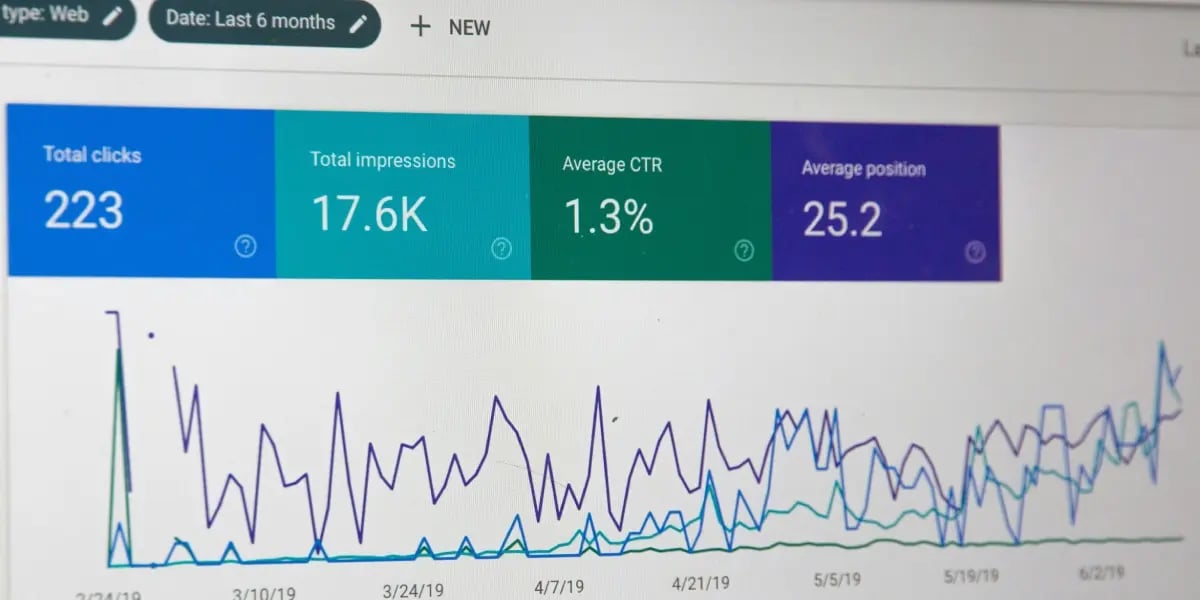
You need powerful SEO tools that slice through clutter and reveal exactly what you need to fix, where to invest, and the impact on revenue. At a minimum, your stack should include keyword research tools, site audit tools from a website crawler, rank tracking, content optimization, and reporting, all without requiring enterprise-level teams and budgets.
1. Keyword discovery
You need tools that help you find lucrative queries, not a data wall. Tools such as Google Keyword Planner and SE Ranking provide keyword ideas, search volume, and difficulty, allowing you to determine if a term is feasible for your domain strength.
Granted, there’s still value in free tools. Use them for ideation and to ‘sense-check’ search trends before you invest budget or content resources. For instance, compare seasonal peaks in searches for “same-day delivery” against “fast shipping” in your industry.
Your core requirement is a clear interface that shows keyword clusters, click potential, and ranking difficulty in one view. That list becomes your content roadmap, your product page targeting, and your internal link structure, not some random blog topics.
2. On-page analysis
On-page tools should be like a demanding but just editor. A good SEO audit, driven by a website crawler, will have a single crawl flag missing title tags, duplicate H1s, thin content, slow pages, and broken internal links.
You then want page-level recommendations: how often to use a primary keyword, which related terms to add, and whether your headings match search intent. Content scores and fundamental engagement metrics, such as time on page and bounce rate, assist you in determining which pages merit rewriting as opposed to full-scale restructuring.
Reports should be simple to export and personalize. You should know what changed, where scores jumped, and which pages still choke performance so your team can triage work, not guess.
3. Backlink monitoring
Backlink features would be risk and opportunity focused. You require transparency on fresh, lost, and toxic links, together with domain authority signals that are easy enough for non-experts to interpret.
Competitor backlink data is just as important. By showing you what blogs, directories, or partners link to your competitors, it provides you with an actionable outreach list. This is where an Ahrefs vs. Semrush vs. Moz comparison can help you understand which platform gives you the backlink depth you need. Schedule alerts for abrupt spikes in low-quality links so you can respond before search engines see it as manipulation.
Eventually, you’ll be able to connect outreach to new links earned and rankings boosted, so link building is evaluated based on results rather than quantity.
4. Rank tracking
Rank tracking provides you a weekly or even daily scoreboard. Seek out tools that track your most important keywords at the device and location level, so you can find out whether a new landing page, product launch or technical fix is really shifting rankings.
Historical graphs are key. If you track six months of positions, you can distinguish seasonal drops from real plunges and respond with content refreshes or internal linking instead of blind panic.
Integrations with Google Analytics, Google Search Console and even Looker Studio (formerly Data Studio) allow you to merge ranking data with traffic and conversions. This is where the real commercial narrative lives.
5. Local SEO
If you depend on foot traffic or service areas for local customers, local SEO support is a must. Your tools should assist you in optimizing and monitoring your Google Business Profile, tracking local pack rankings, and maintaining citation consistency across directories.
Features that surface reviews, ratings trends, and competitor proximity give you clear levers to improve response rates, adjust opening hours, or add services to your profile. Location-based keyword tracking, such as ‘plumber berlin’ versus generic ‘plumber’, indicates where to target landing pages or service area content.
Opt for platforms with transparent dashboards, educational resources, and AI-generated prompts that point out quick wins. Free trials or money-back guarantees mitigate the risk. Customizable reports and alerts keep you in the loop without compelling you to log in daily.
Types of SEO software

You have lots of SEO software options to choose from, but only a few will really clarify your tasks, enhance efficiency, and ultimately increase revenue. The key task is to align the SEO tool category with your existing workflow, budgets, and abilities.
Free SEO tools assist you in initiating keyword research, conducting basic site audits, tracking rankings, and performing straightforward content optimization. These tools tend to have sleek, simple interfaces and allow for a few queries or projects a day, making them ideal for beginners.
Premium tools add scale by crawling hundreds of thousands of URLs, tracking thousands of keywords, offering multi-domain reporting, and providing API access so you can plug SEO data into dashboards or internal systems. For a small business team, a practical path is to start with free and low-tier paid tools, then upgrade when you feel blocked by limits rather than by curiosity.
Standalone tools can be effective when you encounter a specific bottleneck. For instance, a technical SEO crawler is useful for deep audits, a rank tracker helps track key markets, or a content optimization tool flags content rot and surfaces new keyword suggestions for old articles.
Integrated “all-in-one” platforms reduce tool sprawl by combining keyword research, site audits, and content optimization in one place, with consistent reporting. They typically provide training materials and templates so your team remains on point with SEO best practices.
If you’re on WordPress or Webflow, plugins are great at on-page execution. They direct title tags, meta descriptions, headers, internal links, and schema markup right where you write content. They do not replace a focused research or crawling tool, and they reduce mistakes and make day-to-day publishing quicker, especially for non-technical editors using beginner-friendly SEO tools.
AI SEO sits on top of this stack. AI writing tools accelerate content briefs, outlines, and first drafts and can identify gaps against competitors. Traditional SEO software handles the reliable parts: data accuracy, crawl coverage, rank trends, and technical health.
Cloud-based solutions then make this data shareable across your team, with role-based access, scheduled reports, and collaborative notes. That combo provides you both accuracy and volume without overspending.
Choosing your SEO software

You are not purchasing ‘SEO tools.’ You’re purchasing smarter decisions, more efficient workflows, and improved revenue results. Your software selection needs to be helpful and not add weight to your marketing.
Begin by describing success in concrete terms. For some of you, it is ranking for 20 core commercial keywords in 12 months. For some, it is doubling organic leads or reducing paid media reliance by 30%. Before choosing your SEO tool, write your goals down and connect them to required features:
- If you need more qualified leads, prioritize keyword research, competitive analysis, and on-page recommendations.
- If your content team is active, focus on content optimization, topic discovery, and internal linking suggestions.
- If your site is technical or complex, you need strong crawling, technical insights, and clear error reporting.
Then align this with your budget. Most begin with basic plans under $100 a month. More advanced suites can exceed $1,500 per year. Price only makes sense in relation to expected impact. If your average customer is worth $500, paying $120 a month is insignificant if the platform helps you make a couple additional conversions a year.
If you cannot envision a spend-to-revenue path, the tool is not right. Interface quality is something people often underestimate. Certain SEO suites are mighty but cumbersome with cluttered dashboards and opaque terminology. For a shoestring team, that kills adoption.
You want a layout where you can quickly see:
- Priority issues
- Simple explanations
- Clear next actions
If a tool requires a 10-hour course before you can perform a simple audit, it will collect dust. That is fine for agencies with specialists, not for a streamlined small business where one marketer wears five hats.
Support and integration trump shiny feature lists. Test support answer speed and search for reviews that mention poor or slow customer service. If folks are always whining about unhelpful staff, expect that you will be, too.
On integrations, make sure the tool integrates with your analytics, CMS, and reporting stack. A good feature set with clean integrations often trumps a “top” tool that lives in a silo. Always take free trials or demos if offered. Most of the top platforms offer 7 to 30 day access.
Use that time with real tasks: research one campaign, run a site audit, and plan a content calendar. If you are comparing major suites, an Ahrefs, Semrush, and Moz breakdown can make those trial tasks easier to judge. Check if the tool helps you identify seasonal trends, emerging topics, or low-competition keywords before they become saturated.
To keep your decision structured, use a short checklist:
- Obvious fit for your SEO objectives and primary use cases.
- Pricing aligned with your revenue potential, not wishful thinking.
- Interface that non‑experts can use within a week.
- Features that cover your essentials include keyword research, content optimization, and technical insights.
- Responsive, competent support plus active product development.
- Integrations with your current analytics and marketing tools.
- What can scale from where you are today to where you will be.
Beyond automation

Automation in SEO tools, such as powerful SEO tools, saves time. Your edge is how you shepherd those tools, interpret the information, and convert it into commerce. You get your best results when comprehensive tools do the grunt work and you do the benchmarking.
Combine automated tools with manual oversight
Most SEO platforms were designed for agencies, not small teams. They assume you have experts who already “speak SEO.” You likely don’t. So you require tools to automate routine work, and you need your judgment to maintain quality.
Use automation for:
- Keyword discovery and clustering
- Site audits and technical checks
- Rank tracking and change alerts
- AI-assisted outlines and draft content
Then add manual oversight where it matters:
- Review AI content for accuracy, tone, and brand fit
- Re-program title tags and meta descriptions so they sound like people, not templates.
- Contrast keyword recommendations against your real-life sales dialogues and CRM records.
- Make sure those internal links back actual user journeys, not just keyword themes.
Some 60% of marketers already use or experiment with AI. The winners use AI like a junior assistant, not autopilot. A robust AI-powered SEO system, supported by the right AI copywriting and SEO tools, typically manifests significant traffic gains within 60 to 90 days, but only if you maintain a human in the loop.
Build a living checklist and learning routine
SEO is simpler to operate when you consider it as a process, not a project. A basic checklist provides you with a framework and accelerates onboarding for new employees or contractors.
Example checklist:
- * Weekly * Check main rankings for 10 to 20 top keywords.
- Scan automated alerts for mistakes, broken pages, or traffic decreases.
- Record all content ideas from sales and support calls.
- * Monthly * Conduct a comprehensive site audit and address high-priority issues.
- Refresh three to five old pages with better structure, FAQs, and internal links.
- Review performance by landing page, not just keyword.
- Quarterly * Review your core topics and search intent in light of new products or services.
- Cross-reference tool data with analytics and CRM revenue data.
- Cut SEO tools that don’t obviously support revenue.
Add brief explanations to each point so anyone can appreciate its significance. That’s how you go from random acts of SEO to a repeatable system!
Assign roles around your actual workflow
They’re not a full SEO team. You still require obvious ownership, even if your “team” consists of you and a part-time freelancer.
A simple structure:
- *Strategy owner * Sets priorities, budget, and measures of success.
- Determines which tools you retain and for what reasons.
- *Tech lead (in-house or outside) * Manages site speed, indexing, schema, and redirects.
- Makes repairs surfaced by audit tools, which are typically apparent in two to four weeks.
- *Content owner * Translates keyword and topic data into briefs.
- Collaborates with writers and oversees AI-written drafts.
- * Analytics/reporting owner * Links SEO tools with Google Analytics and Looker Studio (Data Studio).
- Constructs dashboards that display traffic, leads, and revenue, not simply rankings.
Freshers in your squad will love neat dashboards and easy notifications. Power users will want integrations so they do not have to export CSVs all day.
Keep your setup and strategy current
SEO tools and search algorithms evolve quickly, and a lot of existing platforms are still stuck in the agency world of 2012. Through 2026, the trend is toward straightforward and inexpensive tools developed for small businesses.
Review your stack and strategy at least twice a year:
- Cut tools where the free tier makes you start from scratch every time.
- Eliminate redundant tools and channel that budget into one or two powerful platforms.
- Benchmark costs against impact: a good rule is investing 5 to 15 percent of your organic search revenue back into SEO tooling.
- Ensure your reports tie rankings to conversions and revenue, not vanity metrics.
Recall that while most tools offer automation, few deliver revenue. Concentrate on those that provide insight, drive operational efficiency and link directly to business outcomes.
Measuring your ROI

You can’t rate “best SEO tools” without considering real returns. ROI is how you tie your investment in tools, content, and people to business results. At its simplest, you are asking: “For every $1 I put into SEO, what do I get back?
Whether you use a simple formula like Gain minus Cost divided by Cost or a more advanced model that factors time and risk, the goal stays the same: protect your budget and back what works.
You deal with reality: some benefits are hard to quantify. Brand lift, trust, or assisted conversions are difficult to quantify. So you shoot for ‘good enough to decide,’ not perfect science. Your SEO stack should make that simpler, not more difficult.
Short answer: solid ROI tracking starts with clean inputs. You want three core streams:
- Organic traffic
- Keyword rankings
- Conversions and revenue
Chances are, you already have Google Analytics or something similar set up for your small business. Combine it with Google Search Console and a rank tracking tool such as SE Ranking, AHrefs, or Semrush, then use an Ahrefs vs. Semrush vs. Moz guide to understand where each platform is strongest.
Together, they show:
- Which queries bring visitors from search
- How those queries rank over time
- What those visitors to your site do includes leads, sales, and sign-ups.
For an online store, you might track organic sessions, add-to-cart rate, checkout completion, and revenue from organic search. For a service firm, you track organic sessions, form fills, booked calls, and closed deals from those leads.
The more you link these steps within your CRM or ecommerce platform, the more assured your ROI figures. As with any marketing activity, clear ROI is a function of clear goals. If you buy SEO tools without measurable objectives, every report will seem nebulous.
Before you upgrade any subscription, write down:
- Traffic goals, such as a 30% increase in organic sessions over 6 months.
- Ranking goals, for example, top three for ten priority queries.
- Conversion goals (for example, a 20% increase in organic leads or a 15% increase in organic revenue)
Make these benchmarks. Month 0 is your baseline. Month 3, 6, and 12 are your checkpoints. You will always have attribution gaps, but if you’re consistent in how you measure, you can still get a before and after comparison with enough accuracy to act.
Good SEO tools don’t just collect data. They transform it into easy, actionable reports. You want dashboards or exports that you can open in a few seconds and answer:
- What changed in the last 30–90 days?
- Which pages and keywords drove that change?
- How did organic traffic and conversions move together?
For stakeholders, create a one-page monthly view:
- Top wins (new rankings, content that drove revenue)
- Key losses (dropped positions, declining pages)
- ROI snapshot: Estimated organic revenue or leads compared to monthly SEO cost, including tools, agency, and internal time.
This doesn’t have to be precise accounting. Even revenue estimating by multiplying an average lead value or order value is better than skipping the discussion. Over a few months, patterns appear. Some tools clearly support results, while others add noise.
Data is only relevant if you do something with it. Use the reporting from your SEO tools to make specific calls:
- Scale what works: content formats, topics, or landing pages that convert.
- Fix what leaks: pages with traffic but poor conversion or technical issues.
- Reallocate spend: drop underused tools and upgrade the ones you rely on daily.
You may discover that a cheaper, specialized rank tracker combined with Google’s free tools provides you more insight than a costly all-in-one platform that you rarely utilize. You may find that better technical audits save your team time guessing at problems.
That’s what the ROI analysis is for — to weigh these options against one another and prioritize. Check your numbers at a regular cadence. Review them monthly for operational tweaks and quarterly for larger strategy revisions.
Accountability through regular reviews keeps you honest and helps you keep SEO decisions focused on growth and profit, not wishful thinking.
Final thoughts
Robust SEO for small business doesn’t begin with tools. It begins with defined objectives, truthful metrics, and relentless implementation.
The right software helps you:
- See how people actually find you
- Fix technical issues before they cost you traffic
- Find realistic keywords you can rank for
- Track what efforts drive revenue, not just clicks
You don’t need an all-in-one “perfect” platform. You need a stack that fits your size, budget, and stage.
Just begin with one to two core tools, measure real impact over a few months, and adjust. With that perspective, your SEO tools are less about chasing rankings and more about building a predictable, growing acquisition channel for your business.
Frequently asked questions
What is the most important SEO tool for a small business just starting out?
If you’re just starting out, use Bing Webmaster Tools first. It’s a free SEO tool that reveals how you look in search and highlights technical SEO problems. Pair it with a basic keyword research tool to discover what your customers are searching for.
How much should a small business spend on SEO tools each month?
Most small businesses start with a budget of $0 to $50 per month, utilizing a friendly SEO tool or a free SEO tool as their first SEO tool. As they demonstrate a clear connection between tool usage and increased traffic or sales, they can scale their budget accordingly.
Do I still need an SEO agency if I use good SEO software?
SEO software, particularly powerful SEO tools, helps you identify problems and potentials. While it doesn’t develop a complete strategy or rich content on its own, using additional tools like free SEO tools can enhance your efforts. If you’re short on time or expertise, an agency or consultant can convert tool data into an unambiguous plan and take care of the complicated stuff for you.
How can I tell if my SEO tools are actually working?
Track a few key metrics each month, such as organic traffic and keyword rankings for your main terms, using powerful SEO tools like Bing Webmaster Tools. If these metrics improve over three to six months, your SEO workflows and strategies are effective.
Are free SEO tools enough for a small business?
Free SEO tools suffice early on or for very small sites, covering SEO fundamentals such as indexing, performance, and basic keyword research. However, as you scale into more competitive niches, a powerful SEO tool tends to be required for deeper data and better insights.
How do I choose between all-in-one SEO software and several specialized tools?
For speed and simplicity, go with a friendly SEO tool that serves as an all-in-one platform. It provides you with the majority of SEO features under one roof. If you have particular needs or are more experienced, multiple SEO tool types can offer you more detailed information. Start simple with basic SEO tools, then add in the specialized tools as you grow.
Can SEO tools help me understand my SEO ROI?
Yes, use powerful SEO tools to monitor traffic, positions, and conversions from organic search. Then weigh the worth of those conversions against your SEO software options and expenses. If organic visitor profit exceeds costs, your SEO ROI is positive.

New to SEO? These beginner SEO tools actually make it easy (2026)
Discover the easiest SEO tools for beginners in 2026 that simplify optimization and grows your online presence effectively.

Free SEO tools for small businesses that actually work
Effective free SEO tools for small businesses that deliver real results and increase your online presence.

Best Keyword Research Tools in 2026: Free & Paid Options Compared
Compare the best keyword research tools in 2026 for SEO, content and competitor research, including Semrush, Ahrefs, Google Keyword Planner and more.